case study
Fitness Tracker Dashboard
Project Information
- Category: Data Visualization
- Tool: Power BI
- Focus: Health Metrics Tracking
- Key Metrics: Heart Rate, Steps, Calories
Project Overview
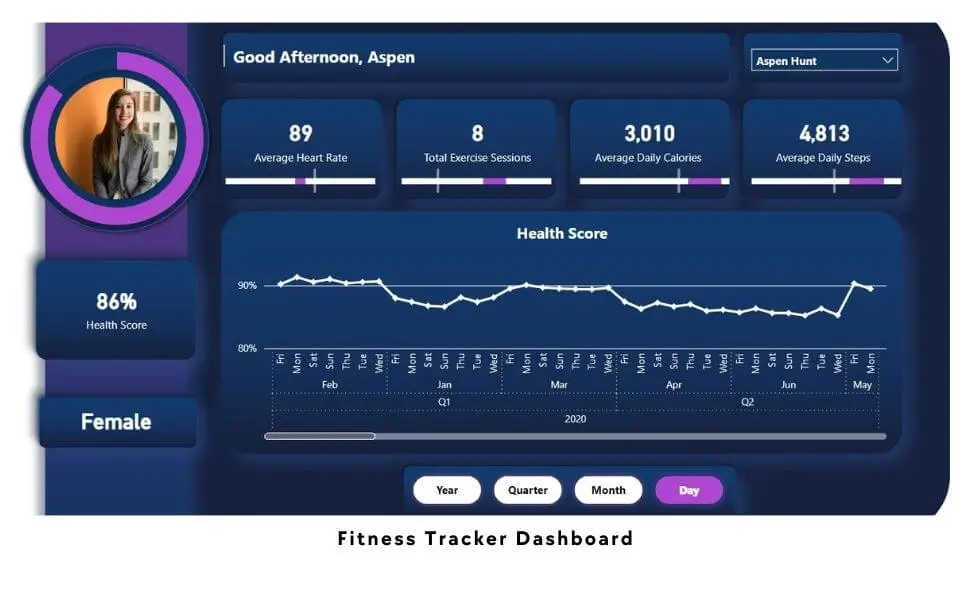
The Fitness Tracker Dashboard on Power BI provides a comprehensive overview of fitness data, tracking essential metrics such as heart rate, exercise sessions, calories burned, and daily steps.
Situation
Users often struggle to interpret scattered fitness data. This dashboard aims to offer an accessible summary of activities, enabling users to monitor progress and make informed decisions about their routines.
Task
The goal was to deliver a clear, informative snapshot of fitness data that allows users to identify areas for improvement and adjust their goals accordingly.
Action
The dashboard visualizes specific fitness metrics, allowing users to filter by profile and time period:
Average Heart Rate
Tracks changes over time to help assess cardiovascular fitness intensity.
Exercise Sessions
Displays the total volume of workouts completed within the selected period.
Calories Burned
Shows average daily expenditure to aid in diet and weight management.
Daily Steps
Monitors movement against daily activity goals to encourage consistency.
Example Insight: Users with consistently low heart rates might consider increasing workout intensity, while those missing step goals can incorporate more walking.
Result
The dashboard empowers users to enhance their fitness journeys through:
- Identification of Improvement Areas: Pinpointing specific metrics that lag behind goals.
- Progress Tracking: Visualizing achievements over time for motivation.
- Informed Decision-Making: Adjusting workout intensity and exercise choices based on data.